POS: Xstore, Xoffice, Retail Insights, Employee Management
This presentation provides an overview of Oracle Retail Xstore Point-of-Service, including features and architecture, as well as store back office features, reporting, employee management, and payments, presented to the Specialized team in August 2022.
Safe harbor statement
The following is intended to outline our general product direction. It is intended for information purposes only, and may not be incorporated into any contract. It is not a commitment to deliver any material, code, or functionality, and should not be relied upon in making purchasing decisions.
The development, release, timing, and pricing of any features or functionality described for Oracle’s products may change and remains at the sole discretion of Oracle Corporation.
Confidential – © 2020 Oracle Restricted
Oracle Confidential – Restricted3
Agenda
1
2
3
Introductions
Customer Data
Point Of Sale
4 Reporting / Analytics
5 Employees
6 Payments
7 Product, Pricing & Promotions
8 Wrap Up
Oracle Confidential – Restricted4
Agenda
1
2
3
Introductions
Customer Data
Point Of Sale
4 Reporting / Analytics
5 Employees
6 Payments
7 Product, Pricing & Promotions
8 Wrap Up
Oracle Confidential – Restricted5
Agenda
1
2
3
Introductions
Customer Data
Point Of Sale
4 Reporting / Analytics
5 Employees
6 Payments
7 Product, Pricing & Promotions
8 Wrap Up
9/7/22Oracle Confidential – Internal/Restricted/Highly Restricted6
Proven ability to handle Retail Reality
Copyright © 2022, Oracle and/or its affiliates. All rights reserved. 7
250,000+ POS Global ly
50+ Brands, 1500+ Stores
in a Single Xoffice
1000+ Items in a Single Transaction
36,000 Reg isters
3650 Stores
500+ mil l ion Transac tions
50,000+ Stores Global ly
300+ Retailers running Xstore
94+ Countries around the globe
2M+ SKU in single produc t f i le
1,200 reg isters in a single store
250+ mobile in a single store
One Customer
Oracle Retail Xstore Point-of-Service Proven Results
Copyright © 2021, Oracle and/or its affiliates. All rights reserved. 8
50,000+ Stores 94+ Countries300+ Retailers250,000+ POS
No. of Devices per
store cultural centre/museum gift shop/services counter 5 Stores, 12 Registers
50+ PoS Flagship Store
London
350+ Mobile devices in Paris flagship,
380 stores in 30 countries
150+ PoS at Flagship
Average 30 tills per store, 229 stores
20 PoS & 80 mobile Dubai Mall (largest shoe
shop in the world 96,000sq ft.)
High Volume Transactions 700+ Stores
242m Transactions p.a. 325+ Stores
40m Transaction p.a.
3,650+ stores, 510m Transactions
p.a.
425+ stores, 25m transactions p.a.
1,000+ stores, 85m Transactions p.a.
Number of Stores
300+ Stores, UK & USA Pilot live within 6
months
33 Countries
1,800+ stores installed on single Instance of Xoffice
29 Countries
3,500+ Stores
23 Countries Across 9 Brands
8,000+ stores global
12 brands Global 440 Stores
16 countries
Number of Countries
41 Countries 1,300 Stores
28 Countries 300+ Stores
Confidential – © 2022 Oracle Internal/Restricted/Highly Restricted9
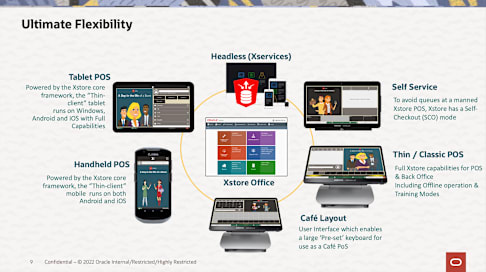
Ultimate Flexibility
Thin / Classic POS
Tablet POS
Handheld POS
Xstore Office
Headless (Xservices)
Full Xstore capabilities for POS & Back Office Including Offline operation & Training Modes
Powered by the Xstore core framework, the “Thin-
client” tablet runs on Windows,
Android and iOS with Full Capabilities
Powered by the Xstore core framework, the “Thin-client”
mobile runs on both Android and iOS
Café Layout User Interface which enables a large ‘Pre-set’ keyboard for use as a Café PoS
Self Service To avoid queues at a manned Xstore POS, Xstore has a Self- Checkout (SCO) mode
Copyright © 2021, Oracle and/or its affiliates10
• One Common Data Model
• One Common Operational Workflow
• One Common Set of Business Logic
• One Common Code Base
• Code Once, Run Anywhere
Top Business Priorities
Employee/customer health & safety
Work-from-anywhere
Digital customer experiences
Resilient and agile supply chains
Real-time scenario planning
Sustainability
Industry-specific needs
Single Code Base
Handheld
Tablet
Café Layout
Thin UI / Classic
Self Service
Copyright © 2022 Oracle and/or its affiliates11
• Ensures Offline Availability
• Ensures Data Protection
• High Availability for all devices
• Minimal store footprint
How components interact together
Replication
Store Lead
App ServerPrimary Data Source
https https
XStore Office Cloud
https https
SERIES Xstore PoS Mobile First: The IP Enabled Store
Xstore is designed for Store Mobility and can be run on various different types of Hardware. It provides the ability to connect to: • Fixed Peripherals • IP Printers • IP Cash Drawers • IP PED’s (Pin Entry Devices) • Bluetooth Scanners • Bluetooth PED’s
In conjunction with EFTLink Xstore is designed to provide:
• Printer Sharing • PED Pooling
Store Network Fixed or Wireless
SERIES Xstore Suite Xstore PoS: Rich Features Set
Omnichannel 70+ Journey's Delivery, Pickup, Same Store Pickup, Work Orders, Web & Store Initiated …
Smart Engagement 360 Customer View Endless Attributes, Key Transaction Detail, Member Groups …
Xcommerce Blur the lines between digital & physical
Basics Rich set of transaction types Sales, Returns, Send, Orders, Pre-sale, Hold, Warranty, Registry …
Inventory Enable Accurate Inventory
Back Office Ops Embedded Store Operations
IP Enabled Store Flexible Peripherals
One Build Central Configuration + Deployment
Xstore Point of Service R i c h F e a t u r e S e t
SERIES Xstore Suite Architecture Architecture Model: Temporary Store
Event Store Extended Store
• Store used on a one-off basis
• Requires separate store number
• Utilizes own Inventory
• Fixed duration of operation
• Location used on an extended time period – Holiday, promotional event
• Utilized for full pop-up activities – new location each time, parties, showers etc.
• Utilizes a Parent physical store • Shares store number • Has shared inventory & reporting
Standalone One-off Events Temporary Location associated with a parent store
Oracle Confidential – Restricted16
Agenda
1
2
3
Introductions
Customer Data
Point Of Sale
4 Reporting / Analytics
5 Employees
6 Payments
7 Product, Pricing & Promotions
8 Wrap Up
SERIES Xstore Suite Architecture Architecture: Service/API Based
Consumer Engagement Customer Services
(I.e. Add/Edit/View Consent, Notes, Contact Preferences,
Wish Lists)
Card Services (I.e. Loyalty Sign Up)
Attribute Services (I.e. Demographics)
Registry Services (i.e. Gift List)
Task Services (Tasks, Appointments)
Loyalty Account Services
Customer Loyalty & Awards
Retail Extensions
Omni-Channel Orders
Card Payment Services (PSP)
Gift Card Services
Sales Extended Commerce
(External Basket into POS)
Item Lookup (URL to Website Info)
Digital Cart (I.e. Abandoned Basket
from E-Commerce)
Payment Services Omni-Channel
Key:
Pre-Integrated 3rd Party Services
3rd Party
QAS Address Lookup
Global Blue Tax Free
Planet Tax Free
EFTLink Credit/Debit Card Payments with 3rd Party PSP
EFTLInk Gift Card Services with 3rd Party PSP
Gift Card Services with Oracle Gift Card Cloud Service
Order Pick/Confirm (i.e. Status Updates)
Omni-Channel Orders (Collection, Delivery)
Order Collection
Order Delivery Loyalty E-Award Services
Loyalty Entitlement Services
Deals & Promotions
Targeted Promotion Eligibility
Single Use (Serialised) Coupon Eligibility
Fiscal Integration (Hardware/Software)
External Tax Engine (I.e. Vertex)
Web Returns
External Inventory (I.e. SIOCS or 3rd Party)
Oracle Confidential – Restricted19
Agenda
1
2
3
Introductions
Customer Data
Point Of Sale
4 Reporting / Analytics
5 Employees
6 Payments
7 Product, Pricing & Promotions
8 Wrap Up
SERIES Xstore PoS Store Administration Features: Back Office Menu
C as
h M
an ag
em en
t
• Till/Drawer Management • Floats, Cash Pickup, Cash Transfer, Mid-Day Deposit, Spot- Check, Count (Cash-Up) & Reconcile.
• Safe Management •Safe Open/Close, Safe Cash Deposit, Safe Reconciliation, Safe Audit & Banking (Bank Deposit).
• Open/Close •Open Store, Close Store & Force Close Register, Change Business Date, Check for Updates & Refresh Promotions
• Till Options •Change Float, No Sale, Paid In, Paid Out, Post Void, Tender Exchange & Foreign Currency Maintenance.
In ve
n to
ry M
an ag
em en
t • Receiving•ASN, Transfer, Replenishment, Order & Special Order.
• Shipping •Store Transfer, Return, Repair, Return to Vendor, Call Back & Sale
•Inventory Adjustments • Inventory Replenishment • Item Transfer • Item Replenishment • Inventory Locations • Print Shelf Labels/Tickets • Serial Number Exchange • Inventory Counting •Store Layout Maintenance & Inventory Count • Inventory Reports
• Customer Maintenance • Layaway Maintenance • Special Order Maintenance • Gift Registry • Balance Inquiry •Gift Card, Gift Certificate, Gift Receipt, Loyalty Balance & Store Credit Balance
• Invoice Options • Invoice Search & Issue Tax Free Invoice
• Orders • Order Maintenance, Order
Status Report, Order Worklist & Unfulfillable Order Status
• Work Orders • Work Order Maintenance,
Receive Work Orders, Ship Work Orders, Work Order Invoicing & Invoice History
C u
st o
m er
M an
ag em
en t • Employee Management
•Associate Advance, Employee Borrow & Employee Maintenance
• Scheduling Maintenance •Employee Schedule, Maintain Time-Off & Shift Maintenance
• Time and Attendance •Payroll & Timecard Maintenance & Regenerate Payroll File
• Message Maintenance
• Associate •Associate Tasks, View Schedule, View Scheduled Employees, View Timecard & Change PasswordA
ss o
ci at
e &
E m
p lo
ye e
M an
ag em
en t
R ep
o rt
in g
• Dashboard
• Daily Sales Reports
• Sales Analysis Reports
• Store Accounting Reports
• Product Oriented Reports
• Order Tracking Reports
• Layaway Reports
• Labour Management
• Inventory Reports
• Customer Reports
• Store Locations Reports
• Gift Registry Report
• Wish List Report
• Pick List Report
• Airport Report
• Country Pack Reports
SERIES Xstore PoS Store Administration Features: Back Office Menu
C as
h M
an ag
em en
t
• Till/Drawer Management • Floats, Cash Pickup, Cash Transfer, Mid-Day Deposit, Spot- Check, Count (Cash-Up) & Reconcile.
• Safe Management •Safe Open/Close, Safe Cash Deposit, Safe Reconciliation, Safe Audit & Banking (Bank Deposit).
• Open/Close •Open Store, Close Store & Force Close Register, Change Business Date, Check for Updates & Refresh Promotions
• Till Options •Change Float, No Sale, Paid In, Paid Out, Post Void, Tender Exchange & Foreign Currency Maintenance.
In ve
n to
ry M
an ag
em en
t • Receiving•ASN, Transfer, Replenishment, Order & Special Order.
• Shipping •Store Transfer, Return, Repair, Return to Vendor, Call Back & Sale
•Inventory Adjustments • Inventory Replenishment • Item Transfer • Item Replenishment • Inventory Locations • Print Shelf Labels/Tickets • Serial Number Exchange • Inventory Counting •Store Layout Maintenance & Inventory Count • Inventory Reports
• Customer Maintenance • Layaway Maintenance • Special Order Maintenance • Gift Registry • Balance Inquiry •Gift Card, Gift Certificate, Gift Receipt, Loyalty Balance & Store Credit Balance
• Invoice Options • Invoice Search & Issue Tax Free Invoice
• Orders • Order Maintenance, Order
Status Report, Order Worklist & Unfulfillable Order Status
• Work Orders • Work Order Maintenance,
Receive Work Orders, Ship Work Orders, Work Order Invoicing & Invoice History
C u
st o
m er
M an
ag em
en t • Employee Management
•Associate Advance, Employee Borrow & Employee Maintenance
• Scheduling Maintenance •Employee Schedule, Maintain Time-Off & Shift Maintenance
• Time and Attendance •Payroll & Timecard Maintenance & Regenerate Payroll File
• Message Maintenance
• Associate •Associate Tasks, View Schedule, View Scheduled Employees, View Timecard & Change PasswordA
ss o
ci at
e &
E m
p lo
ye e
M an
ag em
en t
R ep
o rt
in g
• Dashboard
• Daily Sales Reports
• Sales Analysis Reports
• Store Accounting Reports
• Product Oriented Reports
• Order Tracking Reports
• Layaway Reports
• Labour Management
• Inventory Reports
• Customer Reports
• Store Locations Reports
• Gift Registry Report
• Wish List Report
• Pick List Report
• Airport Report
• Country Pack Reports
SERIES Xstore PoS Back Office Menu: Reports
Daily Sales Reports
• Flash Sales Summary Report • Flash Sales by Department Report • Flash Sales by Hour Report • Flash Sales by Employee Report
• Daily Sales Report • Daily Sales and Cash Report
Layaway Reports
• Layaway Aging Reports • Layaway Account Activity Reports
Sales Analysis Reports
• Employee Productivity Report • Sales by Hour Report • Sales by Department Report • Sales by Department and
Employee Report • Sales by Hour Analysis Report • Tax Exemption Report • Journal Report • Line Void Report • Post Void Reports • Transaction Cancel Reports • Price Override Report • Suspended Transaction Reports • Sales Goals Report • Merchandise Sales Analysis
Report
Store Accounting Reports
• Drawer Reconciliation Report • Associate Reconciliation Report • Cash Drawer Audit Report • Cash Drawer Report • Paid In/Paid Out Report • No Sale Report • No Sale Report • Credit Card Report • Gift Certificate Report
Product Oriented Reports
• Best Sellers Report • Returned Merchandise Report • Price Change Report
Dashboard
• Sales Dashboard
Order Tracking Reports
• Special Orders Report • Order Status Report • Unfulfillable Order Status Report
Labour Management Reports
• Payroll Reports • Posted Timecard Report • Open Timecard Report • Employee Performance Report • Employee Schedule Report • Employee Time Off Summary
Report • Employee Tasks Report
Inventory Reports
• Inventory Movement Report • Inventory Stock Cost Report • Shipping/Receiving Exception
Reports • Shipping Manifest Report • Receiving Report • Restock Report • Item List Report • Inventory Movement Pending Report • Inventory Movement History Report • Inventory Adjustment Report • Open Product Request Summary
Report • Replenishment Product Request
Report • Replenishment Order Worksheet • Shelf Labels • Store Layout • Inventory Count Sheet • Inventory Count Variance Reports
Other Reports
• Store Locations Report
• Gift Registry Report
• Wish List Report
• Pick List Report
• Airport Sales Tax Report
Country Pack Reports
• Daily Report • Invoice Report
Xstore Office Only Reports
• Stock Valuation • Period Weighted Average Cost
(PWAC) • Weighted Average Cost (WAC)
• Airport Authority Report
Customer Reports
• Customer List Report • Loyalty Account History Report • Customer Account Activity Summary
Report
24 Confidential – © 2020 Oracle Restricted
Oracle Retail Insights
ü How are my stores performing?
ü How is my merchandise performing?
ü How are my people performing?
ü What trends exist in my stores throughout the day?
ü How can we exploit these insights?
Oracle Confidential – Restricted25
Agenda
1
2
3
Introductions
Customer Data
Point Of Sale
4 Reporting / Analytics
5 Employees
6 Payments
7 Product, Pricing & Promotions
8 Wrap Up
SERIES Xstore PoS Store Administration Features: Back Office Menu
C as
h M
an ag
em en
t
• Till/Drawer Management • Floats, Cash Pickup, Cash Transfer, Mid-Day Deposit, Spot- Check, Count (Cash-Up) & Reconcile.
• Safe Management •Safe Open/Close, Safe Cash Deposit, Safe Reconciliation, Safe Audit & Banking (Bank Deposit).
• Open/Close •Open Store, Close Store & Force Close Register, Change Business Date, Check for Updates & Refresh Promotions
• Till Options •Change Float, No Sale, Paid In, Paid Out, Post Void, Tender Exchange & Foreign Currency Maintenance.
In ve
n to
ry M
an ag
em en
t • Receiving•ASN, Transfer, Replenishment, Order & Special Order.
• Shipping •Store Transfer, Return, Repair, Return to Vendor, Call Back & Sale
•Inventory Adjustments • Inventory Replenishment • Item Transfer • Item Replenishment • Inventory Locations • Print Shelf Labels/Tickets • Serial Number Exchange • Inventory Counting •Store Layout Maintenance & Inventory Count • Inventory Reports
• Customer Maintenance • Layaway Maintenance • Special Order Maintenance • Gift Registry • Balance Inquiry •Gift Card, Gift Certificate, Gift Receipt, Loyalty Balance & Store Credit Balance
• Invoice Options • Invoice Search & Issue Tax Free Invoice
• Orders • Order Maintenance, Order
Status Report, Order Worklist & Unfulfillable Order Status
• Work Orders • Work Order Maintenance,
Receive Work Orders, Ship Work Orders, Work Order Invoicing & Invoice History
C u
st o
m er
M an
ag em
en t • Employee Management
•Associate Advance, Employee Borrow & Employee Maintenance
• Scheduling Maintenance •Employee Schedule, Maintain Time-Off & Shift Maintenance
• Time and Attendance •Payroll & Timecard Maintenance & Regenerate Payroll File
• Message Maintenance
• Associate •Associate Tasks, View Schedule, View Scheduled Employees, View Timecard & Change PasswordA
ss o
ci at
e &
E m
p lo
ye e
M an
ag em
en t
R ep
o rt
in g
• Dashboard
• Daily Sales Reports
• Sales Analysis Reports
• Store Accounting Reports
• Product Oriented Reports
• Order Tracking Reports
• Layaway Reports
• Labour Management
• Inventory Reports
• Customer Reports
• Store Locations Reports
• Gift Registry Report
• Wish List Report
• Pick List Report
• Airport Report
• Country Pack Reports
Oracle Confidential – Restricted28
Agenda
1
2
3
Introductions
Customer Data
Point Of Sale
4 Reporting / Analytics
5 Employees
6 Payments
7 Product, Pricing & Promotions
8 Wrap Up
SERIES Xstore PoS: EFTLink Integration Remove PoS from PCI Scope with EFTLink
Payment Device
ORACLE XSTORE
Point of Service Application
Acquiring Platform
Merchant’s Bank
EFTLink
Oracle Solutions Partner Solutions Acquirers & Banks
Connectivity • Serial • USB • Wi-Fi • Cat5
Card Issuers
GatewayPayment Application
PSP Dependent
SERIES Xstore PoS: EFTLink Integration Maximise Mobility with PED Pooling
The EFTLINK Server (PED Pooling) allows to connect as many POS as desired to as many payment gateways – it maintains a map of available
payment gateway and exposes them to the POS.
P S
P P
S P
Bluetooth
Serial /IP
E F
T L
IN K
S erver
PSP Dependent
PSP Cores / OPI Framework
Oracle Payment Interface (OPI) is a payment card-processing interface that integrates with the Oracle Hospitality Point-of-Sale (POS), OPERA, Suite 8 (PMS) and Retail (POS) systems. It defines a standard interface that partner payment service providers can implement to provide credit card processing functionality to Oracle Hospitality OPERA, POS and also Oracle Retail Point of Sale (POS) Systems.
Validated OPI Partner Cores
Validated Partner Cores
TLG SolveConnect
SERIES Xstore PoS: EFTLink Integration PED’s: Digital Wallets through QR Scanning
Payment via Customers Phone using Payment Method App.
The Customer will select the Alipay App on their Mobile Device and then select ‘Scan’ to scan the Barcode on the PED to confirm the payment and amount.
.
Alipay App is Selected
Barcode from PED is
scanned via Alipay app
POS emerging payment types
XSTORE POS
EFTLINK
Adyen PIN Entry
Device
Adyen Back End
Processing
1
2
3 4
5
6
Emerging Payments
Support Multi-Payment Cores
Oracle Confidential – Restricted35
Agenda
1
2
3
Introductions
Customer Data
Point Of Sale
4 Reporting / Analytics
5 Employees
6 Payments
7 Product, Pricing & Promotions
8 Wrap Up
Oracle Confidential – Restricted36
Agenda
1
2
3
Introductions
Customer Data
Point Of Sale
4 Reporting / Analytics
5 Employees
6 Payments
7 Product, Pricing & Promotions
8 Wrap Up